# Setting up Bot Appearance
## How do I get to edit Bot Appearance?
1. Log in to [Dashboard](https://app.orimon.ai/login) using your Google account/manual signup
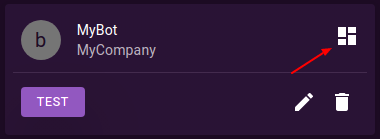
2. Once logged in, you should see an overview icon for your bot. Click on it to go to the bot's overview page.
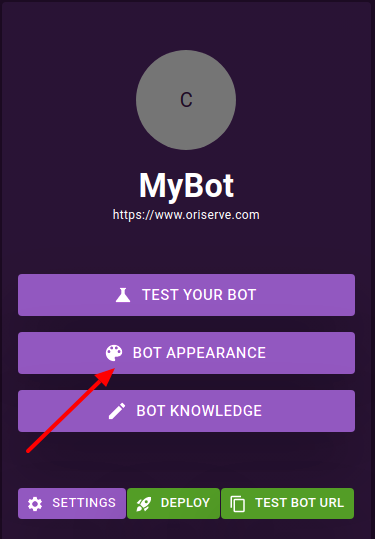
3. On the overview page, you will see several tabs. Look for the one labeled "Bot Appearance" and click on it.
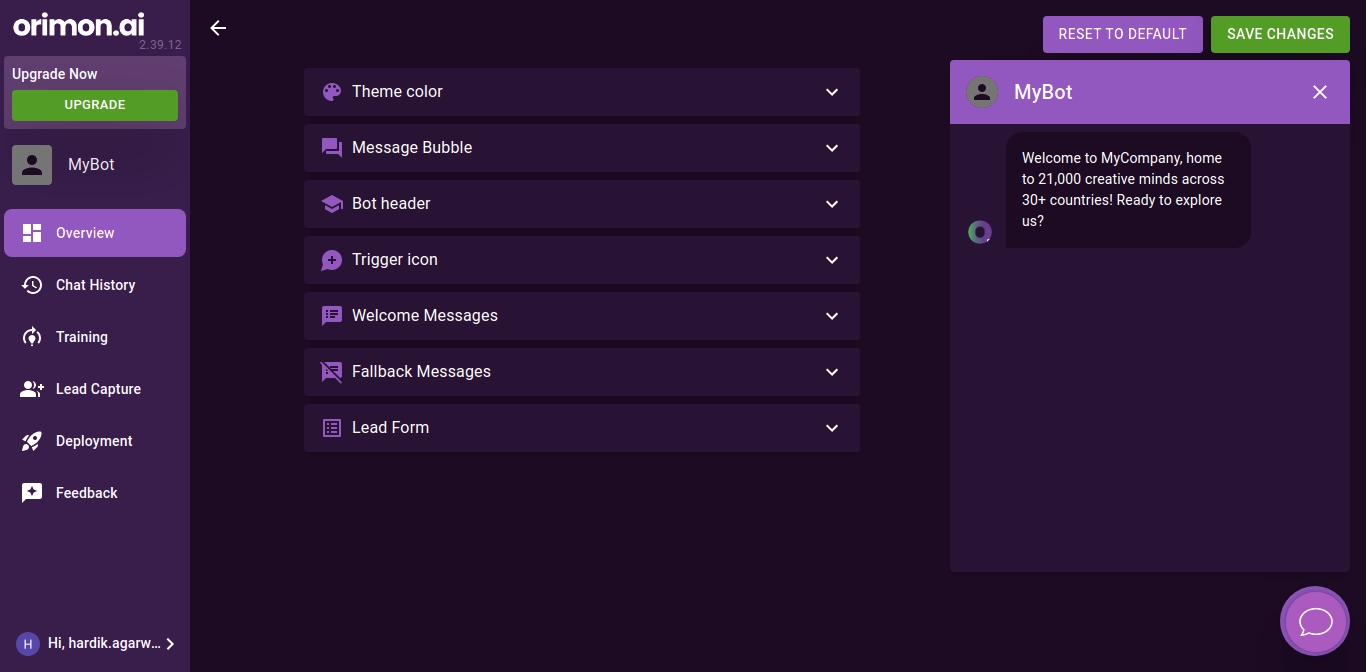
4. You should now be taken to a page where you can customise your bot's appearance.
5. Once you have made the desired changes to your bot's appearance, make sure to click the "Save Changes" button to apply them.
## Quick Links
{% content-ref url="setting-up-bot-appearance/setting-theme-color" %}
[setting-theme-color](https://orimon.gitbook.io/docs/~/changes/8B7YkHnhDRATnjUlfXy5/product-guides/setting-up-bot-appearance/setting-theme-color)
{% endcontent-ref %}
{% content-ref url="setting-up-bot-appearance/setting-message-bubble" %}
[setting-message-bubble](https://orimon.gitbook.io/docs/~/changes/8B7YkHnhDRATnjUlfXy5/product-guides/setting-up-bot-appearance/setting-message-bubble)
{% endcontent-ref %}
{% content-ref url="setting-up-bot-appearance/setting-bot-header" %}
[setting-bot-header](https://orimon.gitbook.io/docs/~/changes/8B7YkHnhDRATnjUlfXy5/product-guides/setting-up-bot-appearance/setting-bot-header)
{% endcontent-ref %}
{% content-ref url="setting-up-bot-appearance/setting-trigger-icon" %}
[setting-trigger-icon](https://orimon.gitbook.io/docs/~/changes/8B7YkHnhDRATnjUlfXy5/product-guides/setting-up-bot-appearance/setting-trigger-icon)
{% endcontent-ref %}
{% content-ref url="setting-up-bot-appearance/setting-welcome-message" %}
[setting-welcome-message](https://orimon.gitbook.io/docs/~/changes/8B7YkHnhDRATnjUlfXy5/product-guides/setting-up-bot-appearance/setting-welcome-message)
{% endcontent-ref %}
{% content-ref url="setting-up-bot-appearance/setting-fallback-message" %}
[setting-fallback-message](https://orimon.gitbook.io/docs/~/changes/8B7YkHnhDRATnjUlfXy5/product-guides/setting-up-bot-appearance/setting-fallback-message)
{% endcontent-ref %}
{% content-ref url="setting-up-bot-appearance/setting-lead-form" %}
[setting-lead-form](https://orimon.gitbook.io/docs/~/changes/8B7YkHnhDRATnjUlfXy5/product-guides/setting-up-bot-appearance/setting-lead-form)
{% endcontent-ref %}